


How to Troubleshoot Common 3D Printing Issues and Save Your Prints
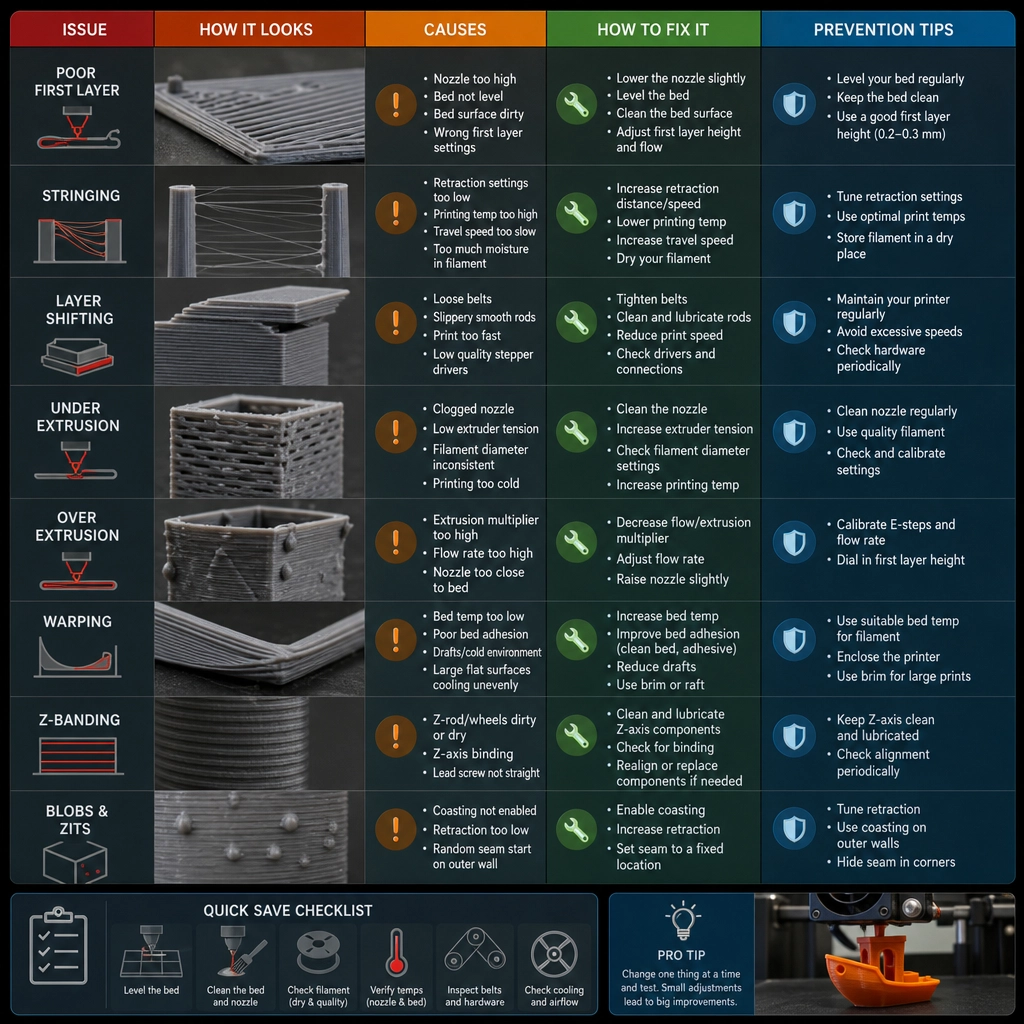
Ah, the magic of 3D printing! Turning a digital file into a tangible object right in the comfort of your home is truly a marvel of modern technology. But, like any artistic endeavor, sometimes things don’t go as smoothly as we’d hope. Fear not! If you ever find yourself battling with your 3D printer, you’re not alone. Let’s take a look at some common 3D printing issues and how to troubleshoot them, so you can save your prints and get back to creating.
1. Filament Won’t Stick to the Build Plate
One of the most common hiccups in 3D printing is when your filament refuses to stick. Nothing is more frustrating than watching your creation start to wobble and collapse!
What to Do:
- Level Your Bed: Make sure that your build plate is perfectly level. An uneven surface can lead to adhesion issues. Most printers have a leveling routine you can run just before you start printing.
- Clean the Build Surface: Dust and oils can hinder adhesion. A quick wipe with isopropyl alcohol can help ensure a clean surface for your print to cling to.
- Use the Right Adhesive: Sometimes, adding a little glue stick, painter’s tape, or a dedicated build surface like a PEI sheet can give your prints that extra grip.
2. Stringing and Oozing
If you’ve noticed wispy strings connecting parts of your print or small blobs of filament stuck to your piece, you might be dealing with stringing.
What to Do:
- Temperature Adjustments: Lowering the nozzle temperature can help reduce oozing. Try reducing it by 5-10 degrees Celsius to see if it improves the situation.
- Retraction Settings: Adjust your printer’s retraction settings. Increasing the retraction distance or speed can help pull the filament back into the nozzle, preventing it from oozing out during travel moves.
- Print Speed: Slowing down your print speed can also help reduce stringing by allowing the filament to settle without excessive pulling.
3. Warped Prints
Warpage is the devil in the details, especially for larger prints. If edges curl or lift off the print bed, your final product might not resemble what you envisioned.
What to Do:
- Temperature Control: Ensure your heated bed is set to the appropriate temperature and that your filament type’s settings are correct.
- Enclosure: If possible, keep your printer in an enclosure to help maintain a consistent temperature throughout the printing process, minimizing temperature fluctuations that can lead to warping.
- Layer Cooling: If you’re using a cooling fan, make sure it’s not blowing directly on the print until it’s solidified. Sudden cooling can contribute significantly to warping.
4. Layer Misalignment
When your print layers don’t line up as intended, it can be incredibly disheartening. Layer misalignment can lead to structural weaknesses and unsightly prints.
What to Do:
- Check Belts and Gears: Tighten any loose belts and make sure that the pulleys or gears are functioning smoothly without obstruction.
- Look for Z-Axis Issues: Ensure that the lead screw is lubricated and the Z-axis is not misaligned. Also, ensure that the Z-offset is properly calibrated.
- Examine the Print Speed: High speeds may contribute to misalignment; try slowing down your print speed to improve accuracy.
5. Inconsistent Extrusion
When your printer goes from a steady flow to a sputtering mess, your printed items might end up looking more like a jumble of strings than something useful.
What to Do:
- Check Filament Quality: Old or moisture-laden filament can lead to clogs or inconsistent extrusion. Store your filament properly and consider drying it out before use.
- Nozzle Clogs: Regularly check and clean your nozzle. A simple cold pull or using a cleaning filament can solve many extruder issues.
- Extruder Calibration: Make sure your extruder steps are calibrated properly. This ensures that what you tell the extruder to do matches what it’s actually doing.
With a little patience and a willingness to experiment, most common 3D printing issues can be fixed readily. Remember that even the best makers encounter problems from time to time. Consider every failed print a learning experience!
The beauty of 3D printing lies not just in the final product, but in the journey of creation. So, the next time you encounter a pesky problem, take a deep breath, roll up your sleeves, and troubleshoot. Your next masterpiece awaits!